MDX-Based Website Git Workflow Architecture
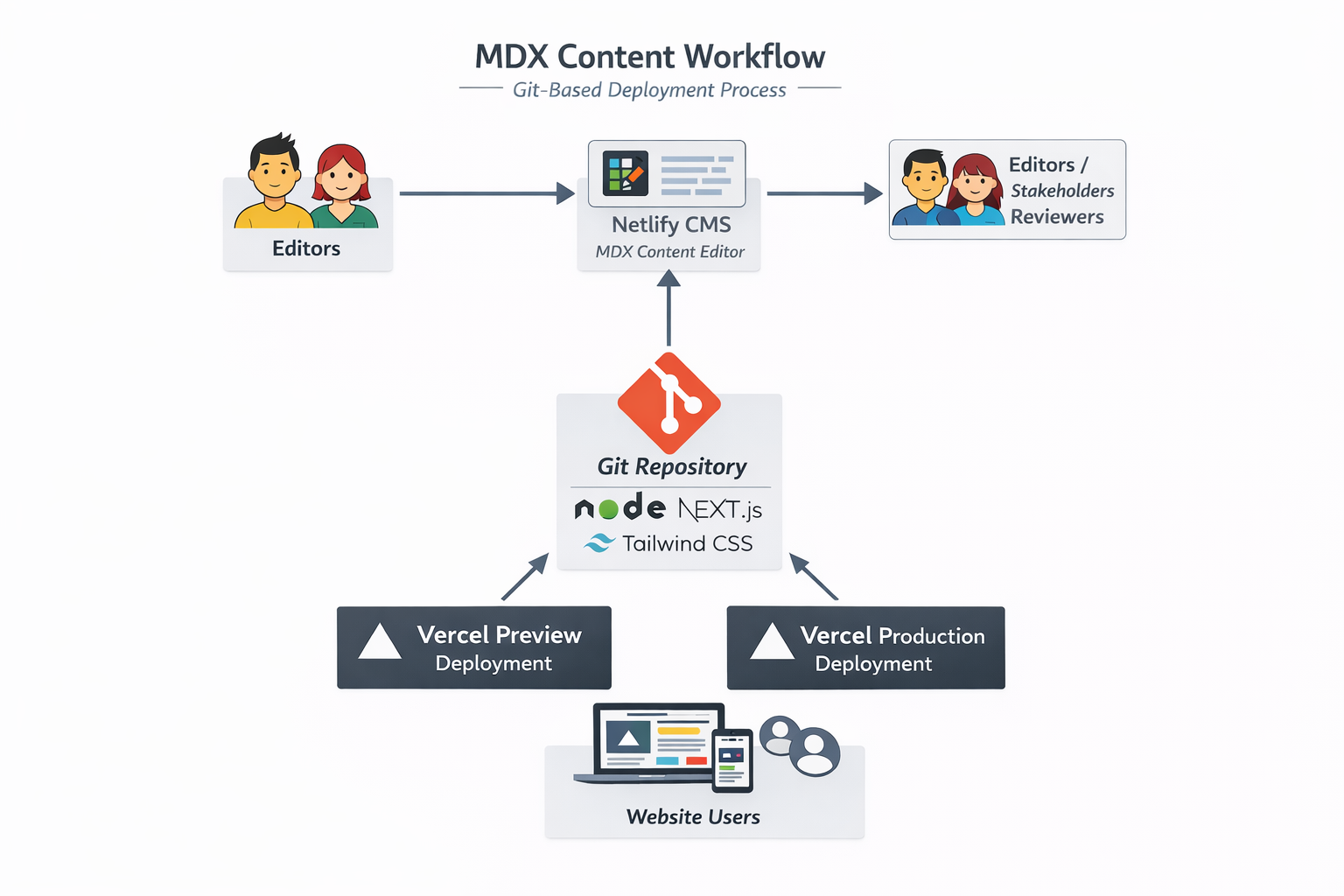
This website uses a Git-based content workflow for managing MDX files, enabling editors to create and maintain content efficiently, with automated preview and production deployments through Vercel.
Editors
Content creators or editors use Netlify CMS, an editor interface that allows them to edit MDX content without touching the code directly. This simplifies content management for non-technical users.
Git Repository (Central Hub)
Netlify CMS commits all content changes to the Git repository, making Git the single source of truth. The repository also contains the project code, including:
- Node.js – server runtime for Next.js
- Next.js – framework for building the site with MDX content
- Tailwind CSS – styling framework
Git triggers automated deployments and serves as the hub for both preview and production builds.
Vercel Deployments
- Preview Deployment – Creates a live preview of content for editors and reviewers to verify changes.
- Production Deployment – Publishes the final content to the live website for public users.
Users
Visitors access the website through the Vercel Production Deployment, ensuring all content is up-to-date, stable, and consistent.
Key Benefits
- Centralized content management: Git acts as a single source of truth.
- Seamless preview workflow: Editors and reviewers can see changes before going live.
- Automated deployments: Vercel ensures continuous delivery without manual intervention.
- Modern tech stack: Node.js, Next.js, and Tailwind CSS provide performance, flexibility, and easy styling.
- Versioning and auditability: Every content change is tracked in Git for easy rollback.
How to Integrate Tina into an Existing Project
Initialize Tina: Run npx @tinacms/cli@latest init in your project root to add the necessary configuration files and dependencies.
Define Collections (.tina/config.js): Configure Tina to recognize your MDX files. You must define collections, specifying where your MDX files live (path) and the structure of your content.
Define Fields: Set up fields in your schema that map to your MDX frontmatter (e.g., title, date, tags) and the body content.
Register MDX Components: In your schema, define the MDX components ("blocks") to make them available in the rich text editor.
Run Development Server: Use npm run dev (or equivalent) to start the local Tina server, which syncs with your filesystem.
Edit Content: Navigate to /admin on your site to start using the CMS.